Posts

Ubuntu 9.10 (Karmic Koala) Released

Ubuntu 9.10 (Karmic Koala) is released and is live at http://noncdn.releases.ubuntu.com//releases/9.10/ Get it while its hot. Click here for more info. If you already have alpha, beta or rc iso image you can use zsync  to update the iso you have and thus save bandwidth. More info:  use zsync to update existing iso images Don't forget you can also use torrent to download the iso. But whatever you do don't forget to check md5sum . If you have slow internet and downloading takes ages, I hope you didn't miss my earlier post  shipit karmic koala
Thunderbird Minimize To Tray

Mozilla Thunderbird can be minimized to tray with some additional plugins. These plugins also notifies of new email beside hiding Thunderbird to tray. 1) moztraybiff URL:  http://moztraybiff.mozdev.org/releases.html To notify of new email message the color of tray icon is changed. But with current version we can't get the Thunderbird inbuilt new email notification system. Note: This release has the unfortunate side-effect of disabling the new Thunderbird 2.0 feature of popping up an alert box for incoming mail. Currently it's impossible to have both my extension and this feature working together. In future versions, this is fixed. In this version, you can always restore the alert box feature by disabling or uninstalling this extension. 2) Firetray URL: http://code.google.com/p/firetray/ I like this plugin better as there is no compatibility problem with inbuilt new email notification system The tray icon changes to number of unread email messages. You hav...

Shipit Karmic Koala

Shipit request for Karmic Koala CD is live in  https://shipit.ubuntu.com/ If you don't have good internet to download the awesome version of Karmic Koala, you can get Canonical to shipit for you( and also for free). https://shipit.ubuntu.com/

How To Open VirtualBox Guest OS Directly

Image
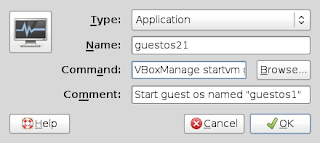
Opening guest OS in VirtualBox requires an extra click. You have to open VirtualBox OSE from Accessories and click start to run guest OS. Instead of this you can create a launcher to directly open VirtualBox guest OS. So just a single click and your guest OS will start running. The backend for this is powerful VBoxManage CLI command. It can do lot more than the GUI can do. For example check how to hide menubar and statusbar in VirtualBox. Now to open guest OS directly from panel do the following. I'll assume your guest OS name as "guestos1" Right click empty area in panel and choose Add to Panel Select Custom Application Launcher (its on top) Fill the dialog box it brings as: Type: application Name: guestos1 Command: VBoxManage startvm "guestos1" Comment:  Start guest os names "guestos1" Click the icon and choose icon of your choise Click OK. Now your launcher is ready to open guest os directly.

Beautiful Karmic Koala Desktop

Image
OS: Ubuntu Karmic Koala Beta Theme: Nightly Impression with Conky

Beautiful Horizontal Conky

Image
In the desktop above you can see the horizontal conky at the bottom of the desktop. Following is the configuration file .conkyrc from which you can achieve this. #avoid flicker double_buffer yes #own window to run simultanious 2 or more conkys own_window  yes own_window_transparent yes own_window_type override own_window_hints undecorate,sticky,skip_taskbar,skip_pager #borders draw_borders no border_margin 1 #shades draw_shades no #position gap_x 0 gap_y 1 alignment bottom_left #behaviour update_interval 5 #colour #default_color  8f8f8f default_color    e0e0e0 #default_shade_color 000000 own_window_colour 262729 #font use_xft yes xftfont sans:size=9 # Force UTF8? note that UTF8 support required XFT override_utf8_locale yes #to prevent window from moving use_spacer none minimum_size 1200 0 TEXT ${alignc}${color}Kernel:${color e0e0e0}$kernel${color 000000} | ${color}Uptime:${color e0e0e0}${uptime_short}${color 000...

[Solved] couldn't open demos/TUTORIAL.dm_68

Image
I usually don't play games. This festival season with long vacation we group of guys decided to play some FPS games. As me being the LAN party organizer I was busy checking few games. I checked Unreal Tournament *, Urban Terror , Assault Cube and America's Army . Urban Terror is a free multiplayer first person shooter developed by FrozenSand, that (thanks to the ioquake3-code) does not require Quake III Arena anymore. It is available for Windows, Linux and Macintosh. The current version is 4.1. Yes Urban Terror supports both 32 bit and 64 and Linux, Mac and Windows. To check Urban Terror, first I had to add some bots. Adding bot isn't officially supported but is very easy. Goto console by pressing ~ key  /bot_enable 1 to enable bots  /reload if you have already started the server  /addbot chicken to add bot named chicken or /addbot puma to add puma, here is more bots.  The bots were very difficult for me so I decided to check demo. I couldn't open ...

Internet Monitoring With SARG and Squid On Windows

SARG aka Squid Analysis Report Generator is a nice little tool that analyses Squid's access.log files and creates a management friendly report along with graph. This guide is for someone who have already configured SARG on Linux box . Install Squid on Windows. You can follow this post  squid-on-windows SARG port for windows is available in the SARG website itself  SARG . Or download it by clicking here . Unzip it in C:\sarg Edit sarg.conf file inside c:\sarg\etc Edit access_log graph option output_dir where your web server can be pointed. Others that you think is important. This is very simple file with all needed description. Make your scheduled task to run SARG and rotate Squid log files or restart Squid from services.msc .

Squid On Windows

Here is a short and simple guide for installing Squid on Windows for those who knows how it works in Linux. Windows port for Squid is available from Acme Consulting. Grab it from  http://squid.acmeconsulting.it/ Unzip it and put it in C drive making the folder structure c:\squid You'll find squid.conf file in C:\squid\etc\squid.conf Configure it as per your requirements. (mainly the following) Your hostname Dns server Cache directory ACL logrotate (make sure that the options you choose are available with the squid you chose by running squid -v) Create the cache directory by: Open Command Prompt Go to C:\squid\sbin Run squid.exe -D -z Install the squid service by running squid.exe -i You can manage squid service from services.msc or using the squid.exe CLI. Unlike Linux you may need to pass "-n Squid" as parameters for few commands. Set scheduled task to rotate your log. You may need to use third party software to transparently use this Squid. Unti...

Google Chrome Update Keeps Appearing Even After Removing From Application Sources

I use Google Chrome -unstable as my primary browser and am very happy with it. But one problem I keep facing is it asks me to update the daily build each day. Removing it from /etc/apt/sources.list.d/google-chrome.list doesn't help. So if you also don't want to install the daily build each and every day follow the following steps: Remove the google-chrome apt list from /etc/apt/sources.list Remove the google-chrome.list file from /etc/apt/sources.list.d/google-chrome.list Remove the file /etc/default/google-chrome This should prevent Google Chrome daily updates. P.S. If by change you landed here and don't have Google chrome and want to install it get the daily build from here  or the deb package from here(32 bit)  or here(64 bit) .

Install Firefox 3.5 on OLPC XO

Download Firefox 3.5 from http://www.mozilla.com/en-US/firefox/all.html for Linux. Open your xo Put the extracted Firefox in /home/olpc/Activities Rename it to Firefox. activity Go inside /home/olpc/Activities/Firefox.activity Make a folder "activity" Go inside /home/olpc/Activities/Firefox.activity/activity Make a file activity.info with following content [Activity] name = Firefox service_name = org.laptop.firefox35 icon = firefox activity_version = 35 show_launcher = yes exec = ./firefox Put one svg icon for Firefox in /home/olpc/Activities/Firefox.activity/activity with file name firefox.svg Change the permission of /home/olpc/Activities/Firefox.activity to 755 by running chmod -R 755 /home/olpc/Activities/Firefox.activity Change the owner of the /home/olpc/Activities/Firefox.activity to olpc:olpc by running chown -R olpc:olpc /home/olpc/Activities/Firefox.activity Restart the X server by pressing Alt+Ctrl+Erase Your Firefox 3.5 is ready though y...

Fixing small bugs in Ubuntu

A bugs like typo doesn't require you to have a great technical knowledge. Yet there are many bugs in launchpad that are related to typos. Once you start fixing this kinds of bugs chances are you will move on and start fixing more complex bug simple and small bugs. So how do we get started ? If you haven't missed yesterday's #ubuntu-classroom you should have known a lot. Here I'm just trying to replay yesterday's class by dholbach on " Fixing small bugs in Ubuntu". First of all lets prepare our system. It is recommended to use a development release. Its not important at this moment. For now open your terminal and type: sudo apt-get install --no-install-recommends bzr ubuntu-dev-tools devscripts dpkg-dev cdbs Now make sure you have 'Sources' enabled in System -> Administration -> Software Sources -> Ubuntu Software . Now open ~/.bashrc file in your favorite text editor. Add the following line to it. export DEBFULLNAME='Your...