Posts

Showing posts with the label VirtualBox

Fix Bad Distorted Audio And Sound In Geanymotion

Image
Geanymotion is a great product. As soon as I knew about this, I've been using this for my Android development. One problem bothering me was the audio and sound coming from Geanymotion was totally bad and distorted. Not only that any sound playing in my computer would get distorted for few seconds when sound was playing in Geanymotion. Turns out Geanymotion was using Alsa instead of PulseAudio. To fix this: Open VirtualBox. Yes not Geanymotion. You'll see list of all the Android devices you've created from Geanymotion here. Click on the Android device you want to fix and click settings. Go to Audio tab in settings. In Host Audio Driver change from Alsa to PulseAudio. Press OK to close the settings. Repeat this process for all Android devices. Now run your Android device normally from Geanymotion and you should hear problem free perfect audio.
How To share Windows Drive In Ubuntu Guest Inside VirtualBox

Open VirtualBox Open setting of your guest OS Ubuntu Goto shared folders Click the "Add shred folder" button. Its the button on far right with a plus sign on folder. Give a folder name and the path you want to share. Select "Read-only" if you want the share to be read only. Now open your guest OS Ubuntu Once its on, open terminal and run the command sudo mount.vboxfs name_of_your_shared_folder /mnt

USB Support In VirtualBox

Too often I encounter people having hard time enabling USB support in any version of virtualbox. One main thing that many people don't know is there are two editions of virtualbox virtualbox virtualbox-ose virtualbox-ose or virtualbox open source edition is what all the linux distro installs if installed from package manager. Unlinke virtualbox, virtualbox-ose lacks many feature one of which is usb support. Remote Display Protocol (RDP) Server and USB over RDP are other two missing features. Click here for more up to date and detailed list: You must be clear by now that you need to remove virtualbox-ose and install virtualbox to enable usb support. But remember it is not open source edition. Now, to enable USB support: Remove virtualbox ose if installed sudo aptitude remove virtualbox-ose Install virtualbox You can install by adding virtualbox PPA . Advantage is you'll always get the updates. Or install it by downloading from here . You might require to run ...

How To Open VirtualBox Guest OS Directly

Image
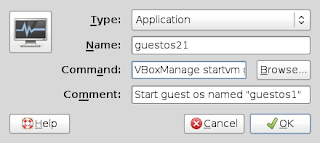
Opening guest OS in VirtualBox requires an extra click. You have to open VirtualBox OSE from Accessories and click start to run guest OS. Instead of this you can create a launcher to directly open VirtualBox guest OS. So just a single click and your guest OS will start running. The backend for this is powerful VBoxManage CLI command. It can do lot more than the GUI can do. For example check how to hide menubar and statusbar in VirtualBox. Now to open guest OS directly from panel do the following. I'll assume your guest OS name as "guestos1" Right click empty area in panel and choose Add to Panel Select Custom Application Launcher (its on top) Fill the dialog box it brings as: Type: application Name: guestos1 Command: VBoxManage startvm "guestos1" Comment:  Start guest os names "guestos1" Click the icon and choose icon of your choise Click OK. Now your launcher is ready to open guest os directly.

Hide Menubar and StatusBar in Virtual Box

There is no option in VirtualBox to hide Menubar and Statusbar. Many people likes to hide them so that they can get maximum space in their guest OS. Virtual Box provides VBoxManage command. It can do all the things that VirtualBox GUI can do. Furthermore it can help us in getting rid of Menubar and Statusbar. Here is a nice example of other VBoxManage commands. Now to disalbe/hide Menubar and Stautsbar open terminal and type: VBoxManage setextradata global GUI/Customizations noMenuBar,noStatusBar where guest_os_name is the name of the virtual machine. To see the name or UID you cau use: VBoxManage list vms After running the first command your VirtualBox guest window will have no Menubar or Statusbar.