Posts

Showing posts with the label Android

Essential adb Command Examples

Copy file to your Android device from your computer adb push    - copy file/dir to device example: adb push c:\mygame.apk /sdcard Copy file from your Android device to your computer adb pull    - copy file/dir from device example: adb pull /sdcard/mymovie.avi c:\downloads Install app from your computer to your Android device adb install [-r] [-s] - push this package file to the device and install it                                  ('-r' means reinstall the app, keeping its data)                                  ('-s' means install on SD card instead of internal storage) example: adb install c:\mygame.apk Uninstall an app from your Android device adb uninstall [-k] - remove this app package from the device                     ...
Slice Bitmap Image In Android

With this simple function you can slice one bitmap image and return array with the sliced images. Just pass in the bitmap you want to slice and number of rows and columns you want it sliced into. public static ArrayList GetSplittedBitmap(Bitmap picture, int numRow, int numColumn){ ArrayList imgs = new ArrayList (); int pieceHeight = picture.getHeight()/numRow; int pieceWidth = picture.getWidth()/numColumn; for(int i=0; i for(int j=0; j imgs.add(Bitmap.createBitmap(picture,j*pieceWidth,i*pieceHeight,pieceWidth,pieceHeight)); } } return imgs; }

aTorrent - Best Android Torrent Client

Image
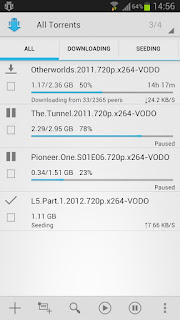
Most of the time there is no electricity in my Country. I am using that time to watch movies on my phone. It is easier to run phone and Wi-Fi router on battery backup than the computer so I started searching for best torrent client for Android phone. My verdict is aTorrent . aTorrent comes in three versions: 1) Free 2) Pro 3) Beta . So this matches rich set of audience. The client itself uses beautiful Android Holo Light theme. Features The must feature that makes this the best torrent client for me are: Download on Wi-Fi only Download only when external power is connected Speed limit Rich notification Easy, beautiful and rick UI Apart from these, the app  comes with: * Torrent search dialog * Magnet links support * Open torrents right from browser * Add torrent from file * Choose download folder * Partial download (choose files from torrent) * Multiple parallel downloading *  Supported protocols: BitTorrent P2P, DHT, Advanced DHT...

Easily Hack Android Games With GameCIH

Image
GameCIH allows you to modify variables of any program you are running. Because of this power many gamer uses this program to increase their score, coins, gold coins, high score, money, level, HP and so on. Only requirement to this simple  yet powerful program is you need to be rooted. The reason you can guess is Android doesn't allow one program to modify other program's value directly. I'll be using this game Hill Climb Racing  to increase my coins level from 100 to 99999999. First let's  download  GameCIH from its website and install and open it. After that let's install/open the game "Hill Climb Racing". As you can see in the picture below I've only 100 coins. The small gray rectangle on top left is GameCIH in minimized mode. We can click that rectangle to bring the full menu. We can click the "Up/Down" arrow to move the menu on different parts of the screen. I've moved it to bottom to easily see the coin numbers. N...

Mark As Unread In Gmail Android Apps

Image
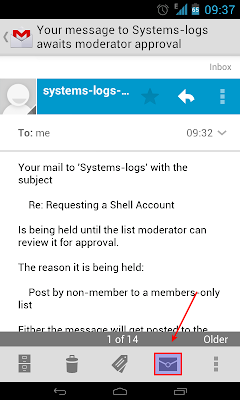
Gmail Android app has mark as unread option as a button which I never found out until recently. The fourth button on action bar with closed  envelope  is mark as unread button. :S Check the screenshot below if you're also confused.

Simulate Battery Removal In HTC Desire

Image
Sometimes, specially when using beta ROM, things stuck up and you get BSOD (Black Screen Of Death). That is, nothing happens when you press any button or touch the screen. At such times the only solution is to take out the battery and replace it and the phone will start normally after powering up. But pulling out the battery is cumbersome specially when you've used fancy case  to protect your phone. To simulate battery removal or to restart the phone press and hold Power , Volume down and Trackpad button for 1, 2 seconds. The phone will restart and power up normally. Please note that this is like restarting your computer by pressing the restart button. This causes unclean shutdown of the phone and may cause data loss. Hence, only use this method when you really have to, i.e. instead of pulling out the battery.

Hide Media Or Folder From Gallery In Android

In Android, apps like Gallery and Music Player will automatically add all the medias that are in your phone. Though this is a wonderful feature sometimes this can cause problem. For eg: I used one program to download some podcast. All the images that this program downloaded are now also visible in Gallery.  This isn't what I want. I don't want to see some tiny unrelated web images downloaded by podcast app in Gallery. In a way this is developers fault. This can be easily prevented by creating a .nomedia  file. If there is a file called .nomedia  in any folders, then any app that auto scans for media will ignore that media. So the developers of app that puts media in you SD card, where the media shouldn't pop up in apps like Gallery need to create .nomedia  file in that folder. If the developer hasn't done so. We can easily create it. We can use any file manager program like ES File Explorer or Astro File Manager . With such program navigate to the folder and c...

Increase Free Space On HTC Desire Android Phones

Are you running out of free space on phones like HTC Desire and variants? It only has about 150MB of free space and after official Gingerbread 2.3.3 update the free space has decreased. Its really frustrating seeing all those apps with 20MB+ size eating up valuable space on Android phones. Even with App2SD I had very very difficult time maintaining free space. Installing apps like Facebook, Google Plus, Google Reader would eat up all the space. Today I used link2sd to increase free space on my Android phone and now I've more than 1GB of free space for installing apps. I've been installed so so many apps now. link2sd can move your application apk, dex and lib files to second partition of your SD card and creates a symlink where necessary. Even when you mount your SD card in computer the apps in SD card will work as only the first partition will be mounted in computer. Requirements : Root MicroSD card Clockworkmod recovery to partitoin the SD ca...

Galaxy Nexus With Ice Cream Sandwich

Samsung and Google just lunched the first Ice Cream Sandwich phone, The Galaxy Nexus . They have bumped the Android version to 4.0. As rumor had spectated the specifications are as follows: Display: 4.65 inch with HD Super AMOLED (1280 x 720)  6:9 sreen ratio 100,000:1 contrast ratio 1.2 GHz dual-core processor 1 GB RAM 16 GB or 32 GB storage HSPA+ or LTE 5 megapixel rear camera with LED flash zero shutter lag 1.3 megapixel front facing camera 1080p video recording and playback Panorama mode NFC Some key points from the event: As the bezel is only 4.29 mm, they were able to make bigger display without increasing the phone size. New typography "Roboto" for HD paper density displays. No physical button on screen. Only virtual button that is part of the UI. Widgets and Apps available on same menu under tab. Resizeable widgets. Application swapped left to right. Favorites tray. Multitask tray to switch app with ...

Ice Cream Sandwich Event

Image
Google and Samsung is hosting, the much awaited Ice Cream Sandwich event tomorrow October the 19 th at Hong kong. The event will start at 1000 hours Hong kong time. We can watch the program live in Youtube at http://youtube.com/android . It will start at 0745 hours Nepal standard time. I hope the event will not be all about over hyped voice app that I've been using in my phone from past few years.

Perm Root HTC Desire Gingerbread 2.3.3

This guide is for permanently rooting HTC Desire running stock Android Gingerbread 2.3.3 . If you want to temp root then you can follow this guide. Before starting please be aware that problems while rooting can brick your phone. While the process in this guide is relatively simple and easy, I can't be held responsible for whatever happens. Enable USB debugging in your phone by going to  Settings  ->  Applications  ->  Development . Plug in your phone to the computer. Go to Revolutionary website  http://revolutionary.io/  . From there download revolutionary software. Leave this browser tab opened. We need to generate Serial key later. Extract the downloaded software on your computer and run the software with root permission. $sudo ./revolutionary It will tell you your serial number and ask for the beta key. Copy the serial number and go to the browser tab we left open while downloading the software. Put the serial key there...

Earthquake And Android

Image
I live in Kathmandu and it is one of the dangerous city in terms of earthquake. Mother nature reminded us this fact yesterday with 6.8 Richter scale earthquake with epicenter in Sikkim, India (281 km). There was few casualties and damage. While I'd always want to get an earthquake alarm like this , its somewhat out of my budget. They have numerous advantages from detecting earthquake before few seconds to auto shutdown of alarm. You can check the page yourself for the complete set off features. Here I will share a couple of Android apps that I reckon will be useful in case of earthquake. Vibration Meter  by  Smart Tools co Vibrometer uses the phone sensors to measure phone's vibration or the earthquake, and shows a reference. I did some testing by putting the phone on flat desk and simulating earthquake by shaking the desk. With right calibration the app was quite impressive. But unfortunately alarm feature was availab...

[Solved] Download Unsuccessful On Android Market

Is your Android market giving you problem? And by problem I mean while installing apps it will download all the way but fail to install saying "Download Unsuccessful". I really don't know what causes this "download unsuccessful" error in Android market. But the fix is very simple and as follows: Go to Settings - Applications -Manage Applications Choose Download Manager In Download Manager option choose "Clear data" If "Clear cache" is not disabled clear cache also. Do the same for "Market" which you will find in similar way in Settings - Applications -Manage Applications If you can't find any of the above app, they may be hidden by filter. Its available under "All", not  "Downloaded".

Temp Root HTC Desire To Enable Market

Enough is enough. Time and again I had to download apk files from risky source because I couldn't find the app in market. Many apps like Skype, Funny Jokes, Google+ is in market but when I had tried to install it, it said "This app is incompatible with your [phone]" and the reason for it was "This item cannot be installed in your device's country". If I fake that my SIM card is from different operator and country, Android market will allow me to install app that are not available in my country. If I fake USA operator I'll get the most app. So I decided to root my phone to fix this for now and for ever. But again I really didn't want to do a permanent root as I'm expecting Gingerbread update any time now. I also have extra slow Internet and currently don't have much free time. And most importantly this phone is very very very ... very expensive for me. It takes year and year of my salary to afford one. Even though chance of bricking is ver...

Swiss Codemonkeys Funny Jokes App Missing From The Market

After resetting my phone I could no longer find  Swiss Codemonkeys Funny Jokes App  in market. It is one of the best funny jokes app. In fact its my favorite bed time app :') . In market.android.com, the app  said "This app is incompatible with your [phone]" and the reason for it was "This item cannot be installed in your device's country". So in order to install the app, I downloaded the apk file from  http://www.freewarelovers.com/android/app/funny-jokes You can directly download the file from your phone's browser or download it in your computer and copy it in your phone. After that it can be easily installed by opening with any file browser like Astro .

Hidden Menu in Android

Image
Dial *#*#4636#*#* in your phone. You'll see a hidden testing menu from where you can see Phone information Battery information Battery history Usage statistics Wifi information