Posts

Offline Install or Update Ubuntu Packages (Without Internet)
Image
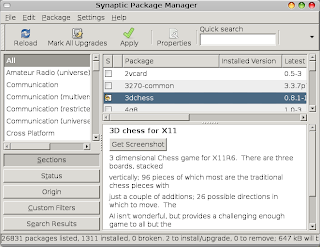
So you have a machine without Internet or the Internet is very slow and you want to update or install Ubuntu and packages. There is a simple way to install packages and softwares in machine that doesn't have Internet with it. First go to the machine that doesn't have Internet, i.e. the machine you want to install packages. Open Synaptic Package Manager from System - Administration Menu. Select the packages you want to install. Go to File and select Generate Package Download Script Save the file and bring it to the computer that has Internet. Run that file. It will download all the packages and its dependencies. Put them in a removable drive. Bring the drive back to the old machine. Open Synaptic Package Manger again. From File menu choose Add Downloaded Packages . You're done. That's 10 easy steps to install software and add packages to Ubuntu box which doesn't have Internet. To update your system follow the same above procedures bu...

compiz problem in Jaunty solved

Today I upgrade few machines to Jaunty Jackalope 9.04. However in machines with Intel's graphic driver I faced two kind of problem with compiz. Problem 1: After upgrading to Jaunty, compiz couldn't be enabled. The error was saying that the driver was backlisted. To solve this create a file ~/.config/compiz/compiz-manager and put SKIP_CHECKS=yes Now enable compiz and it should work. Problem 2: After upgrading to Jaunty, compiz is very slow. You'll easily notice the performance degradation. To solve this you can revert to intrepid driver by following https://wiki.ubuntu.com/ReinhardTartler/X/RevertingIntelDriverTo2.4 But what I did was used "UXA" instead of "EXA". UXA is new and far better but this has some bug, which prevented it from being default in jaunty. To do this open your /etc/X11/xorg.conf and add Option "AccelMethod" "uxa" under Section "Device"

Time to order free Jaunty Jackalope CD

https://shipit.ubuntu.com/ enjoy!!!

captcha full form

Image
I hope you know what captcha is and what it does. But do you know its actually a acronym and it stands for "C ompletely A utomated P ublic T uring test to tell C omputers and H umans A part". Well, I didn't knew it.

vi/vim quick reference

Movement Commands: h move one character left j move one line down k move one line up l move one character right H move to Home (start of first line displayed M move to start of Middle line displayed L move to start of Last line displayed O or ^ move to start of current line $ move to end of current line tc move forwards to just before character c Tc move backwards to just after character c fc move forwards on to character c Fc move backwards on to character c ; repeat last t, T, f, or F command w move forwards to the start of the next word e move forwards to the end of the next word b move backwards a word % move to matching bracket: () [] {} Movement Searching: / Search forwards for regular expression ? Search backwards for regular expression n repeat last search in the same direction N repeat last search in the reverse direction Insert Mode i Insert before the current character a Insert after the current character o Open a new line after the current line O Open a new line before the ...

Adobe Stand Alone Flash Player for Linux

Image
Adobe stand alone flash player for Linux is available. Most of us only need flash plugin for browser to view swf. But sometimes we or most of the times developer wishes for the availability of stand alone flash player for Linux. Stand alone flash player means that you don't need anything to run swf other than the player itself. Yes, you don't need browser or any media player. Get it from http://www.adobe.com/support/flashplayer/downloads.html or download the version 10 directly from http://download.macromedia.com/pub/flashplayer/updaters/10/flash_player_10_linux_dev.tar.gz Not only that you can create self running binaries from the stand alone player.

When ubuntu was created

I was going through an article and found one interesting piece of information presented below. When Ubuntu was created back in 2004, Mark Shuttleworth recorded the very first bug in the online database. However, it wasn’t about software. Instead, it was a revolutionary call to arms. It read as follows: “Microsoft has a majority market share in the new desktop PC marketplace. This is a bug, which Ubuntu is designed to fix”. You can read it yourself here, https://bugs.launchpad.net/ubuntu/+bug/1

Hibernate from Terminal

Q. How do I hibernate from terminal or command line? A. Run 'sudo /etc/acpi/hibernate.sh'

switch compiz with command

You can easily switch compiz on and off with simple command. To switch compiz off, press ALT+F2 and type without quotes "metacity --replace" To switch compiz on, press ALT+F2 and type without quotes "compiz --replace" If you want graphical option then install fusion-icon. Go to System->Administrations->Synaptic Package Manager and install "fusion-icon" Now you can click fusion-icon from Accessories to turn compiz on and off. For ease add it as a launcher.

aptitude and apt-get tutorial

This is a very nice tutorial on aptitude and apt-get. Link http://maketecheasier.com/become-an-apt-guru/2009/02/24

Ctrl-Alt-Backspace is now disabled

Ctrl-Alt-Backspace is key combination to restart X. But for Ubuntu users from Alpha5 of Jaunty Jackalope, this shortcut will be disabled. This can be enabled from xorg.conf or or via the command dontzap --disable. The main reason for disabling Ctrl-Alt-Backspace shortcut is to protect newbies from accidentally restarting X.

Convert line break between Linux and Windows

If you are both Linux's and Window's user then you must know that Linux and Windows uses different line breaks. So If you type something in Linux and open in Window or vice versa then your line will not break properly. However you can easily convert between them. You can either use powerful sed or with a simple program tofrodos . To convert Linux line break to Windows type: unix2dos filename.txt To convert Windows line break to Linux type: dos2unix filename.txt Use -b option if you want to backup the file before changes are made. Use it with find command to perform changes in multiple files.