Posts

cool site for linux

There is a guy called Manu Cornet . He has a wonderful website http://www.whylinuxisbetter.net/ It lists why Linux is better with description. Also it has got reasons why you might still want to stick to Windows. It also lists the way to get Linux. The layout and idea of the website is very cool.

Share Folders in linux for Windows

We can share folders in linux for windows user to access. We can create a share for windows users. To do so first of all install samba . In Ubuntu install it by opening a terminal sudo apt-get install samba Start it by sudo /etc/init.d/samba start You don't need to do this after restart as it gets started automatically on boot. Now create a password for your user sudo smbpasswd -a Share any folder and on windows computer when accessing the share use the above username and newly created password.

Webcam viewer in Ubuntu -Review

Image
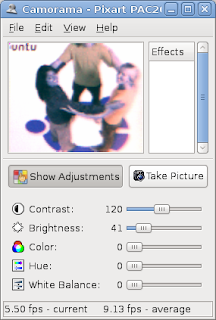
Yesterday I got a webcam whose driver doesn't come with Windows. Fearing to search for the driver I plugged it in my USB and lsusb showed the camera. Quickly I installed three Web camera viewing softwares, camorama, cheese and xawtv. sudo apt-get install camorama cheese xawtv Camorama Camorama had a small preview windows. I tried to preview in small and large mode but it failed. The adjustments were easy to handle. It came with quite good effects. The color correction effects produced better picture out of my dual camera. You can compare yourself the above two pictures. One of the feature of camaroma is auto capturing image. Other feature includes timestamp while capturing photo. You can even put custom message in place of timestamp. When its opened, a tray icon also comes but it has no function. XawTv Should I say I like this application or not? It worked properly but I think its UI is very poor. Instead of saying poor UI you can say its a simp...

Linux Is Beautiful

A cool video between Windows, Mac and Linux or say Microsoft, OS X and Novel. The Windows and Mac guys try to figure out who is number one thinking there are no other OS. But here you'll see Linux, a beautiful lady clearing there misconception.

Open source alternative

Check osalt.com It helps you to find alternative software for the commercial counterpart. When you move to Open source software this might be very helpful friend for you. Give it a try and see if you are using the best of the open source software.

Regular expressions in short

Caret ( ^ ) Matches the expression at the start of a line, as in ^A Question mark ( ? ) Matches the expression at the end of a line, as in A? Backslash ( \ ) Turns off the special meaning of the next character, as in \^ Brackets ( [] ) Matches any one of the enclosed characters, as in [aeiou] (Use a hyphen [ - ] for a range, as in [0-9] .) [^ ] Matches any one character except those enclosed in brackets, as in [^0-9] Period ( . ) Matches a single character of any value except end of line Asterisk ( * ) Matches zero or more of the preceding characters or expressions \{x,y\} Matches x to y occurrences of the preceding \{x\} Matches exactly x occurrences of the preceding \{x,\} Matches x or more oc...
Amarok another Media Player for Linux

Image
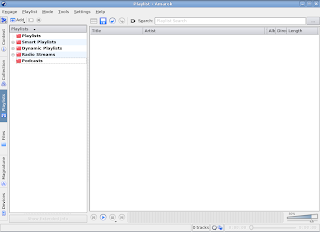
If you have read my post, Media Player for your Linux then you must have tried Exaile. Well, Amarok is from what Exaile was inspired. So give it a try. http://amarok.kde.org/ sudo apt-get install amarok

9th sysadmin day

July 25th, 2008 (Last Friday Of July) 9th Annual System Administrator Appreciation Day http://www.sysadminday.com/

CHM viewer - gnochm

Image
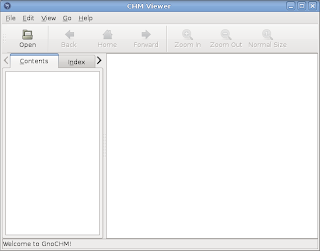
gnochm is a good chm viewer for your Ubuntu machine. Install it by sudo apt-get install gnochm Start it by Menu->Accessories->CHM Viewer

Twitter client, twitux

Image
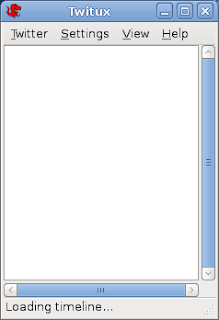
If you twitter then this little client in Ubuntu can be very handy for you. Its called twitux. Go to the site http://live.gnome.org/DanielMorales/Twitux Install it by sudo apt-get install twitux Start it from Menu->Internet->Twitux

When Linux Hangs

Yes! Linux too hangs. By forcing a manual restart you can put your data at risk. So when your desktop freezes you can use ATL+CTRL+BackSpace to restart X or GDM. If that doesn't helps there are other important key sequences that can help you when your computer freezes. They prevent you from file system error during the crash. Also they gives some program to make emergency backup of unsaved work. They are called magic SysRq keys . Please note that they dont work on kernel panic. To safely restart freezed system, Press ALT+PrintScreen While holding them press and release the following keys one by one. R S E I U B Please keep in mind that you need to press each key for 2-3 seconds. These keys are the shortcut for: R aw S ync t E rminate k I ll U nmount re B oot To safely shutdown freezed system, Press ALT+PrintScreen While holding them press and release the following keys one by one. R S E I U O Please keep in mind that you need to press each key for 2-3 seconds. These keys are the s...

free the fish - swimming fish in your desktop

Go to "run application" by pressing ALT+F2 and type free the fish Voila! You have got guest in your desktop!!!!!